![logo_full_orange@3x (1).png]](https://support.botdoc.io/hs-fs/hubfs/logo_full_orange@3x%20(1).png?height=40&name=logo_full_orange@3x%20(1).png)
This is an Enterprise feature, please click HERE to contact us for further information.
Custom Push and Pull Expiration lets your team choose how long Push and Pull links stay active before they expire. By default, Pushes and Pulls expire after 14 days. With this feature enabled, your team can set its own expiration window, from 2 to 45 days.
How It Works:
Push (sending files):
- The download link expires a set number of days after you send it.
- If the receiver opens the link, the expiration date resets to that same number of days after they open it.
Example (30-day setting): You send files on January 1. The link expires on January 31. If the receiver opens the link on January 10, the expiration date moves to February 9.
Pull (requesting files):
- The request link expires a set number of days after you send it.
- If the receiver responds to the request, you can download the returned files for that same number of days after their response.
- Once the files expire, they can no longer be accessed.
Example (4-day setting): You send a request on January 1. The receiver has until January 5 to respond. If the receiver responds on January 3, you can download the files until January 7.
Example (30-day setting): You send a request on January 1. The receiver has until January 31 to respond. If the receiver responds on January 10, you can download the files until February 9.
How to Change Your Expiration Window:
When enabled, Team Owners can change these windows.
- Go to My Team > Edit Your Team Configuration.
- Find Pull Expiration (days) or Push Expiration (days).
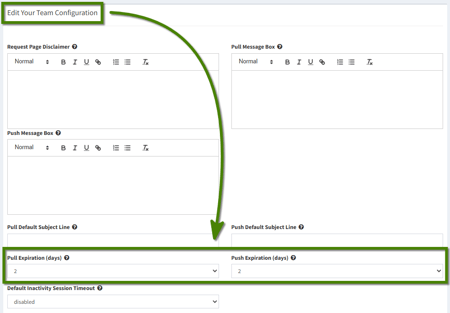
- Select the number of days for each from the dropdown (2 to 45).
- Click Save Team Configuration.

A success message confirms your changes were saved. Your new settings appear on the Dashboard.
Important Notes:
- Changes must be saved to take effect.
- New expiration windows apply only to Pushes and Pulls sent after you save. Pushes and Pulls already sent keep their original expiration.
- The expiration window can be set from 2 to 45 days.
- If expiration notifications are turned on, a reminder email is sent 24 hours before a Push or Pull expires, no matter which expiration window you choose.
- Each Push and Pull shows an Expires in countdown with its exact expiration date and time.