![logo_full_orange@3x (1).png]](https://support.botdoc.io/hs-fs/hubfs/logo_full_orange@3x%20(1).png?height=40&name=logo_full_orange@3x%20(1).png)
This ID Verification (or "ID Verify") functionality is an extension of our Botdoc Secure MFP integrations. If you would like to learn more about our Secure MFP integrations or to add ID Verification to your toolkit, please reach out to sales@botdoc.io.
Prerequisites for use:
- Botdoc Secure MFP integration
- ID Verify add-on
- ID Verify "contact" set in your MFP active directory
Use Steps on MFP:
- Select Email/Scan to Email.
- Select the ID Verify contact.
- Add/Select intended recipient contact(s).
- Place ID face up/picture up and scan.
- Flip ID and scan again.
- Once both scans are complete, press "Send."
Once sent, the scans of the ID and an attached ID Verify report will be sent to the recipients selected in step 3.
Just like our regular "Scan to Email" functionality, the email will be sent from Botdoc.
The email received will have the set verbiage for the MFP and include the Botdoc appended verbiage and the secure URL to download the documents.
The email will include:
"This scan is secured and protected by Botdoc.
Click this link to access your document. {{secure URL}}"
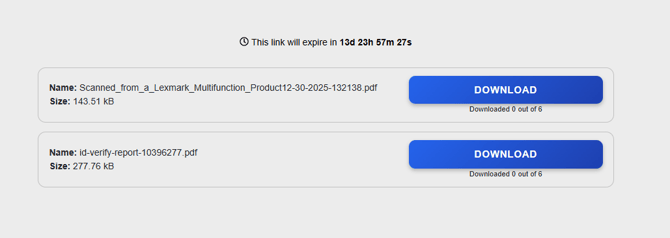
Once you open the URL in the email, there will be options to download the scanned images and the ID Verify report, as shown below: