![logo_full_orange@3x (1).png]](https://support.botdoc.io/hs-fs/hubfs/logo_full_orange@3x%20(1).png?height=40&name=logo_full_orange@3x%20(1).png)
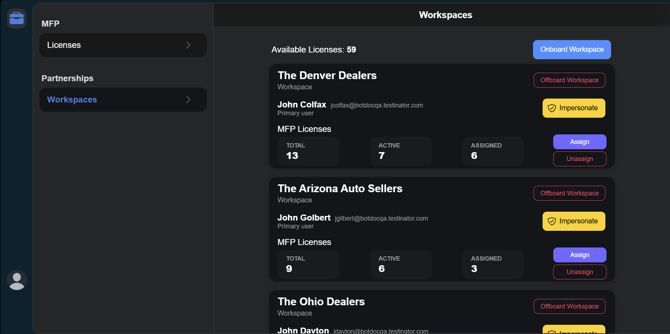
When logged in to your Botdoc Partner Workspace, under Partnerships > Workspaces, you will see available information and options for each onboarded Workspace.
The Information includes:
-
Workspace Name
-
Primary User
-
MFP License counts
The Options include:
-
Offboard Workspace
-
Impersonate
-
Assign
-
Remove
Offboard Workspace: This will offboard a workspace, clearing their MFP licenses and returning them to your "Available" license pool to be reallocated elsewhere.
Impersonate: Partners can impersonate a user within a Workspace to troubleshoot issues, manage MFP devices/licenses, and view the system exactly as that user sees it.
Assign: To assign Available licenses to a Workspace.
Remove: To remove unused licenses from a Workspace.