![logo_full_orange@3x (1).png]](https://support.botdoc.io/hs-fs/hubfs/logo_full_orange@3x%20(1).png?height=40&name=logo_full_orange@3x%20(1).png)
Partners can create a new Workspace using a simple onboarding flow.
During this process, the Partner defines the Workspace and creates a Primary User. The Primary User becomes the main contact for that Workspace.
This is the first step before assigning MFP licenses or managing a Workspace.
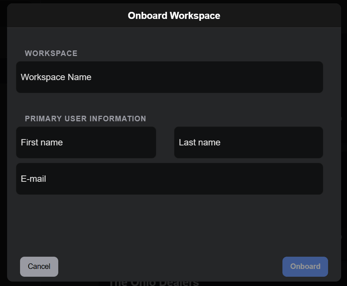
The onboarding form requires the following information:
-
Workspace Name
-
Primary User Name
-
Primary User Email
To get started onboarding a new Workspace, navigate to Partnerships → Workspaces. There will be a button on the top-right that says "Onboard Workspace." Click there to begin.
-
Open the Onboard Workspace form.
-
Enter the Workspace Name.
-
Enter the Primary User’s Name.
-
Enter the Primary User’s Email.
-
Submit the form by clicking "Onboard."
If all required fields are provided, the system creates a new Workspace and a Primary User associated with that Workspace.
An email will be sent to the new user for their new account to be created.