![logo_full_orange@3x (1).png]](https://support.botdoc.io/hs-fs/hubfs/logo_full_orange@3x%20(1).png?height=40&name=logo_full_orange@3x%20(1).png)
Partners can remove MFP licenses from a Workspace when those licenses are no longer needed.
When licenses are removed, they are returned to the Partner’s available license pool so they can be reassigned to other Workspaces.
Currently, only licenses that are "Assigned" and unused can be removed. Licenses that are currently active or in use cannot be removed.
How to Remove Licenses from a Workspace:
-
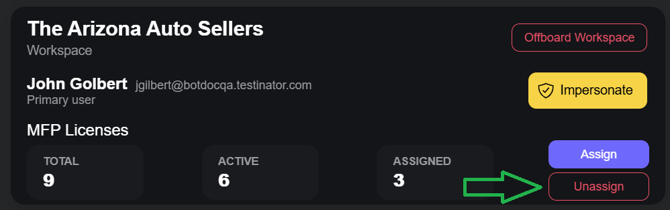
Navigate to the Workspace where the licenses are currently assigned.
-
Locate the "Unassign" button for that Workspace.
-
Enter the number of licenses you would like to remove.
-
Click "Unassign" to confirm the action.
Once unassigned, the licenses will return to the Partner’s available license pool.
Added Notes:
-
Only available licenses can be removed from a Workspace.
-
Licenses that are currently active or in use cannot be removed.
-
The number of licenses removed cannot exceed the number of available licenses assigned to that Workspace.
-
Removed licenses immediately return to the Partner’s available license pool and can be reassigned to other Workspaces.